Editing
Film Look
Grade your footage like film: 41 looks, most named after the stocks they're modelled on, each a set of sliders you can tune.
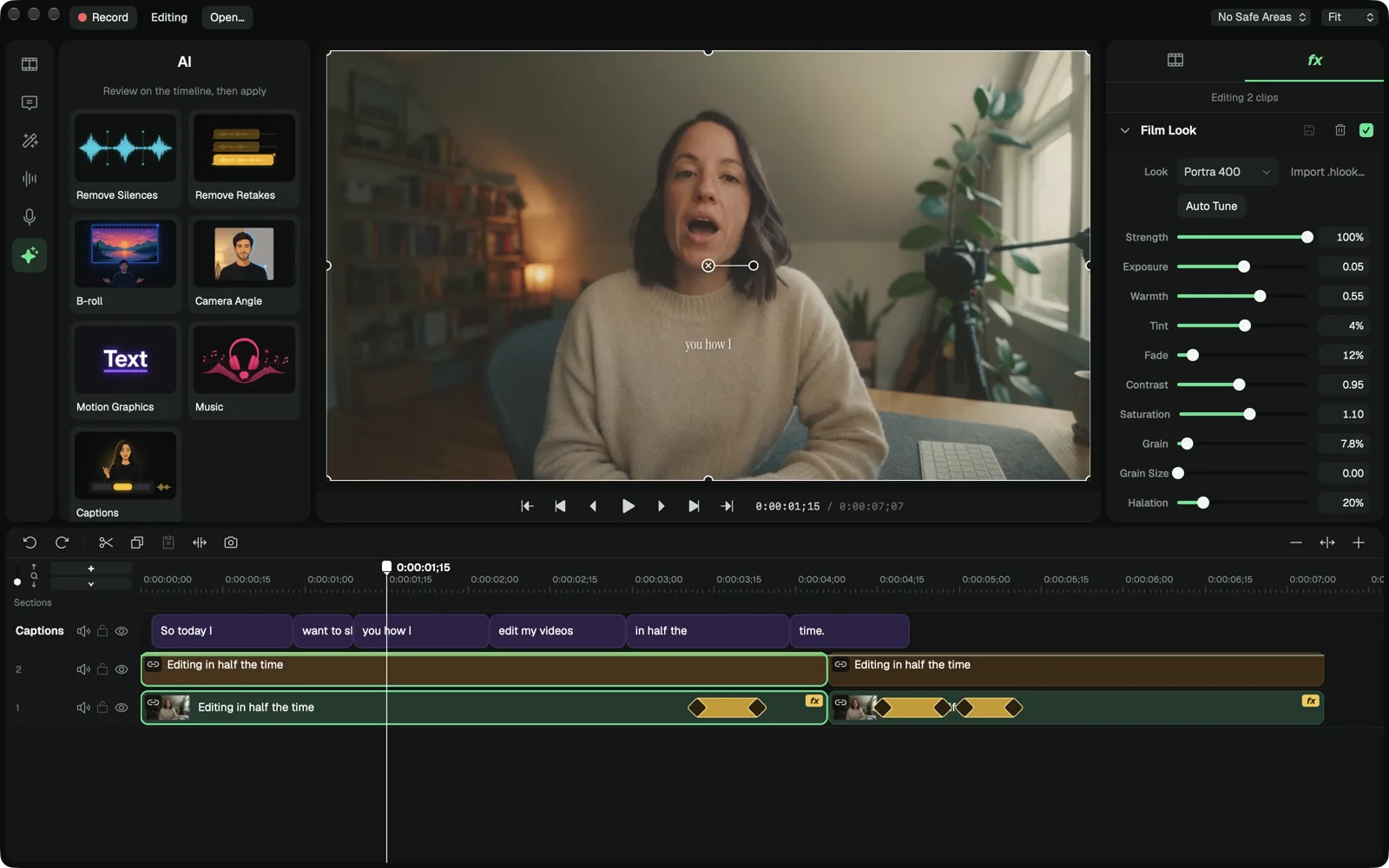
Film Look is a visual effect. Drag it from the Visual Effects panel onto your clips, or select them and add it from ⌘K. Its settings are in the clip’s fx tab.
Looks
The Look menu has 41 looks, most named after the film stocks they’re modelled on: Portra 400, CineStill 800T, Kodachrome 64, Tri-X 400 and more. Point at one to preview it on the canvas before you pick it.
Each look is a starting point on the same sliders: Strength, Exposure, Warmth, Tint, Fade, Contrast, Saturation, Grain, Halation, Vignette and split toning. Turn Strength down to keep a look subtle.
Your own looks
Import .hlook… brings in a look file. Beacon keeps your imported looks for every project, and tells you anything in the file its sliders can’t reproduce.
Auto Tune looks at a few frames of the clip and tunes the sliders to it. It uses an AI model on your own key, for about a cent.
Ask for it
Put Kodachrome 64 on every camera clip, at about 70% strength.Checked against Beacon 0.18.0. Something wrong or missing? Open an issue.
Using an AI agent? Point it at /llms.txt, the docs index for agents, or give it every page in one file.